Understanding JWT Authentication in Express.js
Modern web applications need a way to identify users securely. Imagine a banking app without authentication. Anyone could access another user's account simply by opening the website. Authentication solves this problem by verifying who the user actually is.
In traditional authentication systems, servers usually store user sessions in memory or databases. But modern applications often use a different approach called token-based authentication, especially with APIs and frontend frameworks like React or mobile apps.
One of the most popular token systems is JWT.
What is JWT
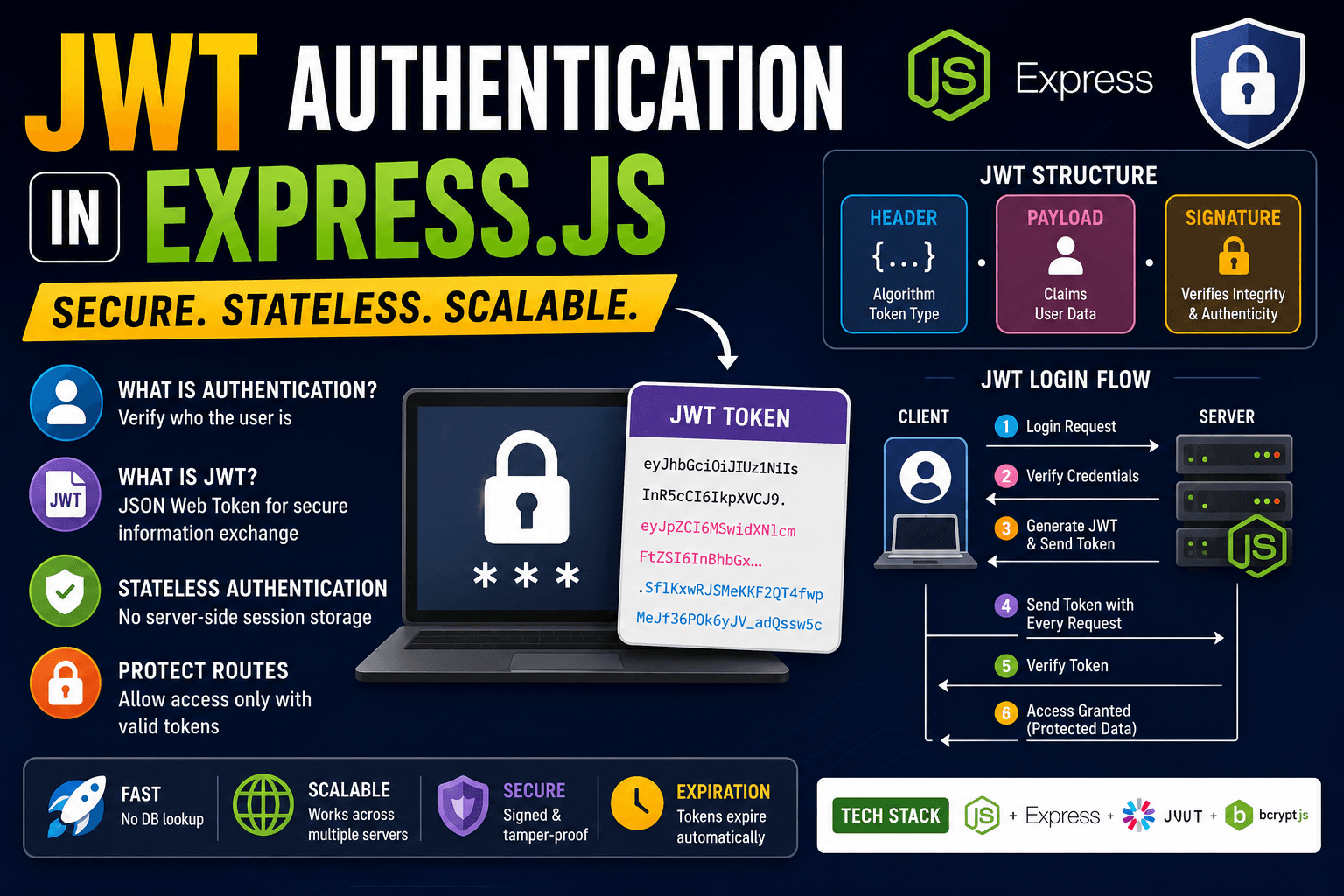
JWT stands for JSON Web Token. It is a compact string used to securely transfer user information between the client and the server. After login, the server generates a token and sends it to the user. The client stores that token and sends it with future requests.
This is called stateless authentication because the server does not need to store session data for every logged-in user.
A JWT looks something like this:
xxxxx.yyyyy.zzzzz
1. Header
The header stores information about the token type and algorithm.
{
  "alg": "HS256",
  "typ": "JWT"
}
2. Payload
The payload contains user-related data.
{
  "id": 101,
  "username": "pallab"
}
This data is called claims.
3. Signature
The signature is used to verify that the token was not modified.
The final token combines all three sections.
JWT Authentication Flow
Here is the overall login process:
User Login Request
        ↓
Server Verifies Credentials
        ↓
Server Generates JWT
        ↓
Client Stores Token
        ↓
Client Sends Token with Requests
        ↓
Server Verifies Token
        ↓
Protected Data Returned
This flow is widely used in REST APIs.
First install required packages.
npm install express jsonwebtoken bcryptjs
Now create a basic Express server.
const express = require("express");
const jwt = require("jsonwebtoken");

const app = express();

app.use(express.json());
Suppose a user logs in successfully.
app.post("/login", (req, res) => {
  const user = {
    id: 1,
    username: "pallab",
  };

  const token = jwt.sign(user, "secretkey", {
    expiresIn: "1h",
  });

  res.json({ token });
});
Here:
jwt.sign()creates the token"secretkey"is used for verificationexpiresInsets token expiration time
After login, the server sends the JWT to the client.
Example response:
{
  "token": "eyJhbGciOiJIUzI1NiIs..."
}
The frontend usually stores this token inside localStorage or cookies.
Now the client must send this token with future requests.
Most applications use the 'Authorisation' header.
Authorization: Bearer YOUR_TOKEN
The word Bearer Simply means the request is carrying a token.
Protecting Routes
JWT becomes useful when protecting private routes.
For example:
app.get("/profile", verifyToken, (req, res) => {
  res.json({
    message: "Protected profile data",
  });
});
Here verifyToken It is middleware that checks whether the token is valid.
Now create the middleware.
function verifyToken(req, res, next) {
  const bearerHeader = req.headers["authorization"];

  if (!bearerHeader) {
    return res.status(403).json({
      message: "Token missing",
    });
  }

  const token = bearerHeader.split(" ")[1];

  jwt.verify(token, "secretkey", (err, decoded) => {
    if (err) {
      return res.status(401).json({
        message: "Invalid token",
      });
    }

    req.user = decoded;
    next();
  });
}
This middleware does three important things:
Reads the token from headers
Verifies whether the token is valid
Allows access only if verification succeeds
If the token is missing or invalid, the route remains protected.
Route Protection Flow
Client Request
      ↓
Token Attached?
   Yes / No
      ↓
Server Verifies JWT
      ↓
Valid Token?
   Yes / No
      ↓
Access Granted or Denied
One major advantage of JWT authentication is scalability. Since the server does not store sessions, APIs become easier to scale across multiple servers.
JWT is commonly used in:
REST APIs
Mobile applications
React applications
Single Page Applications
Microservices
However, JWT should still be handled carefully. Sensitive information should never be stored directly inside payloads because JWT payloads can be decoded easily.
Another important thing is token expiration. Tokens should expire after some time to improve security.
Today, JWT authentication is one of the most widely used authentication systems in modern backend development because it is lightweight, fast, and works extremely well with APIs and frontend frameworks. Understanding JWT properly is essential for anyone learning Express.js and modern web development.