Understanding Virtual DOM in React — Beginner Friendly Guide
One of the most common things developers hear about when starting out with React is the virtual DOM. People frequently say:
React is fast because of the Virtual DOM
But what exactly is the Virtual DOM?
Why was it created?
And how does React use it to update the UI efficiently?
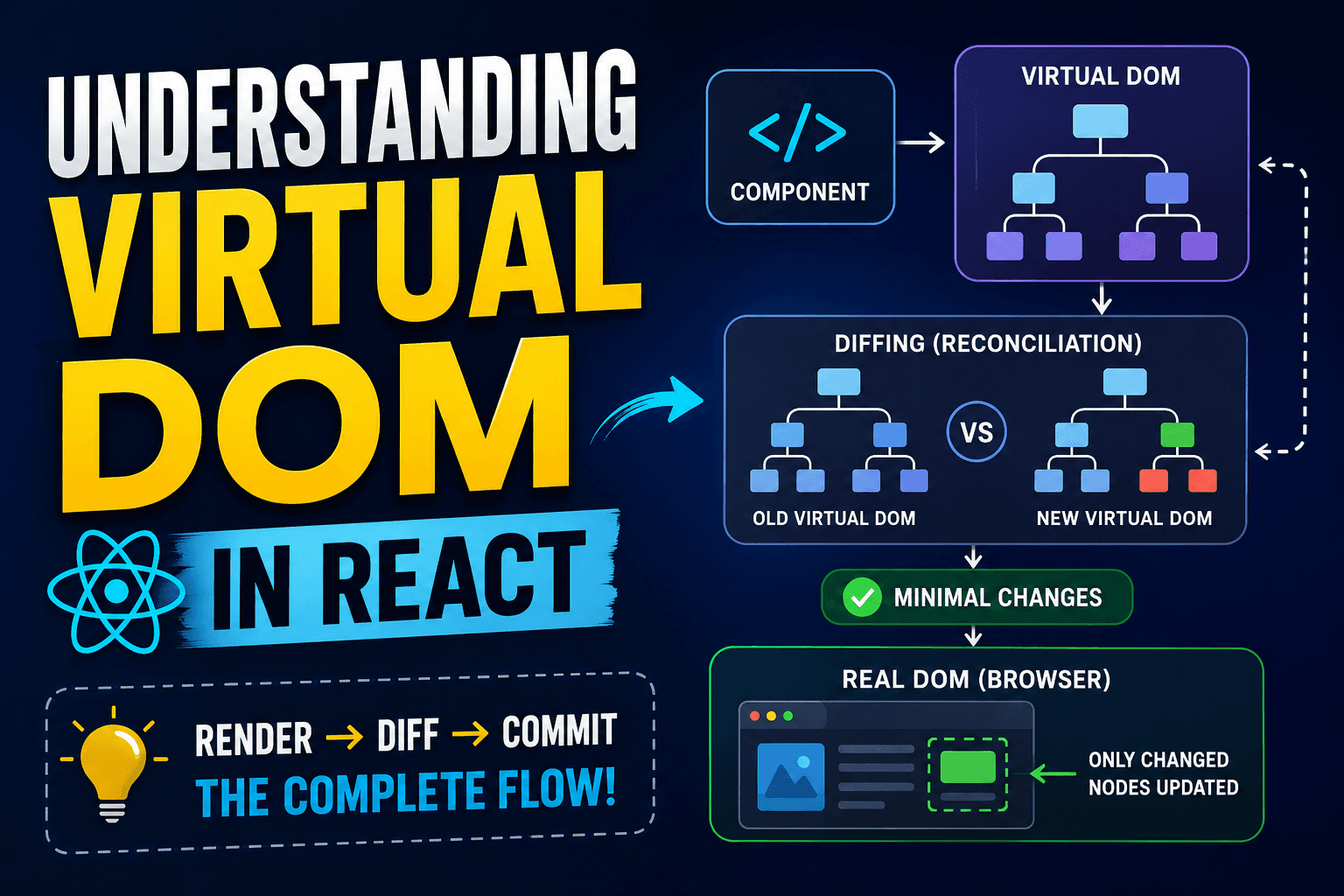
In this article, you will learn the complete flow of how React updates the screen. From rendering the components, comparing the changes, and updating only what is necessary.
By the end, you’ll clearly understand:
What problem does Virtual DOM solve What problem does Virtual DOM solve
Real DOM vs Virtual DOM Real DOM vs Virtual DOM
How React renders the components How React renders the components
When states change what happens When states change what happens
What is diffing and reconciliation? What is diffing and reconciliation?
How fast are React updates? How fast are React updates?
Let’s start from the beginning.
The Problem with Direct DOM Manipulation
Before React, developers would directly manipulate the browser’s Real DOM via JavaScript.
Example:
<h1 id="title">Hello</h1>

<script>
  document.getElementById("title").innerText = "Hello React";
</script>
This works perfectly for small applications.
But the applications today are huge.
Social media feeds
Dashboards(2)
Chat applications
E-commerce sites
In big apps, the UI is always changing.
So every small change in the Real DOM will affect the performance in a bad way. This is because DOM operations are expensive to browsers .
The browser may need to each time the DOM changes:
Recalculate Layouts
Repaint parts
Re-render portions of the page
Doing this repeatedly can drastically reduce performance.
That’s the main problem React tries to solve.
What is the Real DOM?
The Real DOM is the actual structure of elements rendered in the browser.
Example structure:
<body>
  <div>
    <h1>Hello</h1>
    <button>Click</button>
  </div>
</body>
The browser converts this HTML into a tree-like structure called the DOM Tree.
Real DOM Features
Connected directly to the browser
Updating is comparatively costlier Updating is comparatively costlier
Frequent updates will slow applications
Any change may result in re-rendering work Any change may result in re-rendering work
What is the Virtual DOM?
The Virtual DOM is a lightweight JavaScript representation of the Real DOM.
Instead of changing the browser DOM directly, React first creates a virtual copy in memory.
Example Virtual DOM representation:
{
  type: "h1",
  props: {
    children: "Hello"
  }
}
This is not the real browser DOM.
It is just a JS object describing how the UI should look like.
JavaScript objects are very light weight and React can work with them very efficiently.
| Feature | Real DOM | Virtual DOM |
|---|---|---|
| Exists in browser | Yes | No |
| Update speed | Slower | Faster |
| Type | Actual UI elements | JS objects |
| Performance cost | High | Low |
| Updates | Directly modifies UI | Calculates minimal changes first |
Initial Render Process in React
When a React app loads for the first time, React performs an initial render.
The flow looks like this:
React Component
       ↓
Creates Virtual DOM
       ↓
Converts to Real DOM
       ↓
Browser displays UI
Example Component
function App() {
  return <h1>Hello React</h1>;
}
React converts this JSX into a Virtual DOM object.
Then React creates the actual DOM node and displays it in the browser.

What Happens When State Changes?
React applications are dynamic.
Data changes constantly through:
User input
API responses
Button clicks
State updates
Prop changes
Example:
import { useState } from "react";

function Counter() {
  const [count, setCount] = useState(0);

  return (
    <div>
      <h1>{count}</h1>

      <button onClick={() => setCount(count + 1)}>
        Increase
      </button>
    </div>
  );
}
When the button is clicked:
setCount(count + 1);
React does not immediately rebuild the whole browser DOM.
Instead, React follows a smarter process.
React Life Cycle
When state or props change:
React builds a new virtual DOM tree
React compares with the previous tree
React detects differences
React only updates changed parts in Real DOM.
This process is called
Reconcilliation
Creating a New Virtual DOM Tree
Suppose the counter changes from:
<h1>0</h1>
to:
<h1>1</h1>
React creates a new Virtual DOM representation.
Old Virtual DOM:
<h1>0</h1>
New Virtual DOM:
<h1>1</h1>
Now React compares both trees.
State Update and New Tree Diagram

What is Diffing?
This process of comparing the old and new virtual DOM trees is called diffing.
React checks
What's changed
What things stayed the same
What things were added
What was pulled out
React doesn't rebuild everything, it figures out the minimum number of changes needed.
Example:
Before:
<h1>0</h1>
After:
<h1>1</h1>
React notices:
The
<h1>element is the sameOnly the text content changed
So React updates only the text node.
This is much faster than replacing the entire element.
Here’s the complete lifecycle:
Component Render
       ↓
Virtual DOM Created
       ↓
State/Props Change
       ↓
New Virtual DOM Created
       ↓
Diffing (Comparison)
       ↓
Minimal Changes Found
       ↓
Real DOM Updated
       ↓
Browser Repaints UI
What is Reconciliation?
Reconciliation is React’s complete process of:
Creating a new Virtual DOM
Comparing it with the old one
Finding differences
Updating the Real DOM efficiently
You can think of reconciliation as:
“React figuring out the smartest way to update the UI.”
How React Finds the Minimum Changes
React has several internal optimisation techniques.
For the beginners, important concept is:
React updates only what actually changed.
Example:
<div>
  <h1>Hello</h1>
  <button>Click</button>
</div>
If only the button text changes:
<button>Submit</button>
React does not rebuild the entire <div>.
Only the button text gets updated.
This reduces expensive browser operations.

optimisation
The Virtual DOM improves performance because:
1. Reduces Direct DOM Operations
DOM manipulation is expensive.
React minimizes unnecessary updates.
2. Updates Only Changed Elements
Instead of rebuilding the whole UI, React patches only changed nodes.
3. Efficient Re-rendering
React can re-render components frequently without huge performance costs.
4. Better User Experience
Efficient updates create:
Smoother animations
Faster UI interactions
Responsive applications
Important Clarification
Many beginners think:
“React never updates the Real DOM.”
That is incorrect.
React does update the Real DOM, but only after:
Creating Virtual DOM
Comparing changes
Finding minimal updates
The Virtual DOM acts like a smart middle layer.

Simple Mental Model for Beginners
You can think of React like this:
React creates a blueprint of the UI.
When data changes,
React creates a new blueprint,
compares it with the old one,
and updates only the changed parts.
That blueprint is the Virtual DOM.
Final Thoughts
React’s Virtual DOM is one of the most important concepts in React because it allows React to update the UI efficiently without doing unnecessary browser operations.
Instead of changing the Real DOM on every change, React takes a more intelligent approach:
Create Virtual DOM
Compare old and new versions
Find differences
Apply minimal updates
This is called reconciliation, and it helps keep React apps speedy and responsive when the UI changes a lot.