Spread vs Rest Operator in JavaScript
Introduction
If you have worked with modern JavaScript, you have probably seen the triple-dot syntax:
...
At first, this syntax can feel confusing because the same symbol is used for two completely different behaviors. Mainly expands and collects values. This is the actual reason why most developers mess up in interviews.
The important thing to understand is:
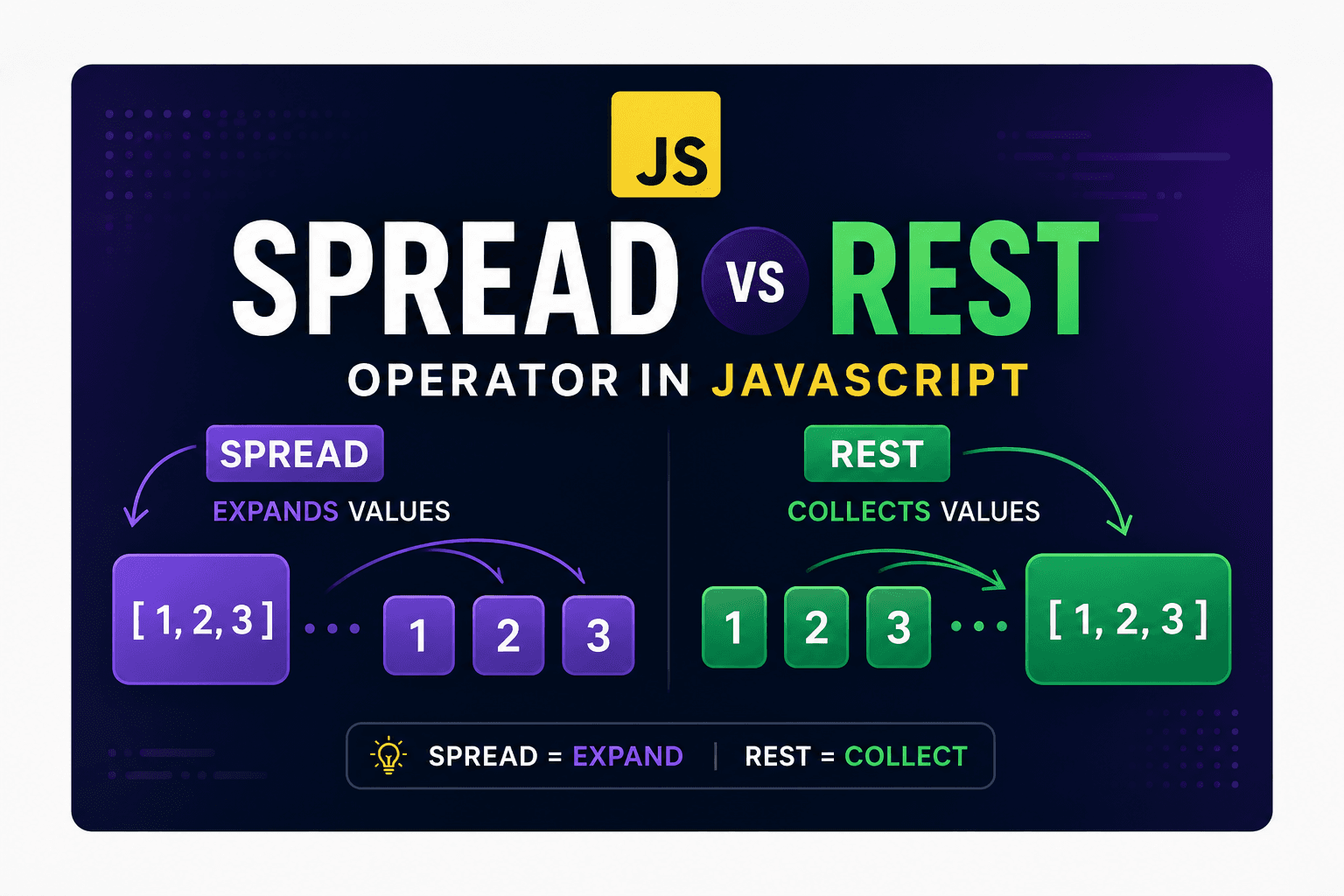
Spread Operator → Expands values
Rest Operator → Collects values
Even though both use the same ... The syntax of their behavior depends entirely on where they are used.
Understanding the Idea with a Simple Analogy
Imagine there is a backup filled with all your items.
Spread Operator
You open the backpack and place every item separatly on the table. Here you are taking things out of the backpack.
Backpack → Notebook, Charger, Mouse
This is exactly what the spread operator does. It takes grouped values and expands them into individual items.
Rest Operator
Now imagine loose items scattered on a table.
You collect all of them and put them into one backpack. Here you are collecting scattered items and putting them again on backpack
Notebook + Charger + Mouse → Backpack
That is how the rest operator works. It gathers multiple values into a single collection.
What is the Spread Operator?
The spread operator expands values from:
Arrays
Objects
Strings
Iterables
Commonly used for coping, margin, cloning, and passing multiple arguments.
Spread Operator with Arrays
Suppose you are building a reading app and want to combine two book lists.
const sciFiBooks = ['Dune', 'Foundation'];
const fantasyBooks = ['Harry Potter', 'The Hobbit'];

const library = [...sciFiBooks, ...fantasyBooks, 'Atomic Habits'];

console.log(library);
Output
[
  'Dune',
  'Foundation',
  'Harry Potter',
  'The Hobbit',
  'Atomic Habits'
]
Copying Arrays with Spread
Without spread, copying arrays manually becomes repetitive.
const original = [10, 20, 30];

const copied = [...original];

console.log(copied);
Output
[10, 20, 30]
Spread Operator with Objects
Spread is also extremely useful when working with objects.
const userProfile = {
  username: 'pallab',
  verified: false
};

const updatedProfile = {
  ...userProfile,
  verified: true
};

console.log(updatedProfile);
Output
{
  username: 'pallab',
  verified: true
}
Why Developers Use This
Instead of modifying the original object directly, spread creates a new object while copying existing properties.
This pattern is heavily used in:
React state management
Redux
Immutable data handling
Spread Operator in Function Calls
Spread can also unpack array elements while calling functions.
const dimensions = [1920, 1080];

function createCanvas(width, height) {
  console.log(`Canvas Size: \({width}x\){height}`);
}

createCanvas(...dimensions);
Output
Canvas Size: 1920x1080
Without spread:
createCanvas(dimensions);
The function would receive the entire array as a single argument.
Spread separates the values automatically.
What is the Rest Operator?
The rest operator collects multiple values and stores them inside a single variable.
It is mostly used in:
Function parameters
Array destructuring
Object destructuring
A simple way to remember it:
Spread → Unpack
Rest → Pack
Rest Operator in Function Parameters
Sometimes you do not know how many arguments a function will receive.
The rest operator helps handle this situation elegantly.
function calculateTotal(...prices) {

  let total = 0;

  for (const price of prices) {
    total += price;
  }

  console.log(`Total Amount: ${total}`);
}

calculateTotal(120, 80, 150, 50);
Output
Total Amount: 400
What Happened Here?
...prices
collected all incoming arguments into one array:
[120, 80, 150, 50]
That means:
pricesbecomes an arrayYou can use array methods on it
The function becomes flexible
Rest Operator in Array Destructuring
Rest is also useful while extracting values from arrays.
const serverLogs = [
  'Error 500',
  'Database Connected',
  'User Logged In',
  'Cache Cleared'
];

const [latestLog, ...olderLogs] = serverLogs;

console.log(latestLog);
console.log(olderLogs);
Output
Error 500

[
  'Database Connected',
  'User Logged In',
  'Cache Cleared'
]
Rest Operator with Objects
You can also separate properties from objects.
const laptop = {
  brand: 'HP',
  processor: 'Ryzen 7',
  ram: '16GB',
  gpu: 'RTX 3050'
};

const { brand, ...specifications } = laptop;

console.log(brand);
console.log(specifications);
Output
HP

{
  processor: 'Ryzen 7',
  ram: '16GB',
  gpu: 'RTX 3050'
}
Key Differences Between Spread and Rest
| Feature | Spread Operator | Rest Operator |
|---|---|---|
| Purpose | Expands values | Collects values |
| Behavior | Unpacks data | Packs data |
| Common Usage | Arrays, objects, function calls | Function params, destructuring |
| Output | Individual values | Single array/object |
| Position | Usually on the right side | Usually on the left side |
| Mental Model | Opening a box | Filling a box |
Real-World Example
Let’s combine both operators in one practical example.
const activeUser = {
  id: 101,
  name: 'Pallab'
};

const permissions = ['read', 'write', 'delete'];

function createSession(user, ...accessRights) {

  return {
    ...user,
    status: 'active',
    permissions: [...accessRights]
  };
}

const session = createSession(activeUser, ...permissions);

console.log(session);
Output
{
  id: 101,
  name: 'Pallab',
  status: 'active',
  permissions: ['read', 'write', 'delete']
}
Common Mistakes Developers Make
Mistake 1: Confusing Spread and Rest
function demo(...items) {}
This is Rest because it collects arguments.
const copied = [...array];
This is Spread because it expands values.
Mistake 2: Rest Must Be Last
This is invalid:
const [...remaining, last] = [1, 2, 3];
Rest elements must always appear at the end.
Correct version:
const [first, ...remaining] = [1, 2, 3];
When to Use Spread
Use spread when you want to:
Merge arrays
Copy arrays
Clone objects
Pass array items individually
Create immutable updates
When to Use Rest
Use rest when you want to:
Accept unlimited function arguments
Collect remaining values
Group leftover items
Simplify destructuring
Final Thoughts
The triple-dot syntax becomes much easier once you focus on its behavior instead of the symbol itself.
Remember This Rule
Spread → Expands values
Rest → Collects values