Understanding Node.js: How JavaScript Moved Beyond the Browser
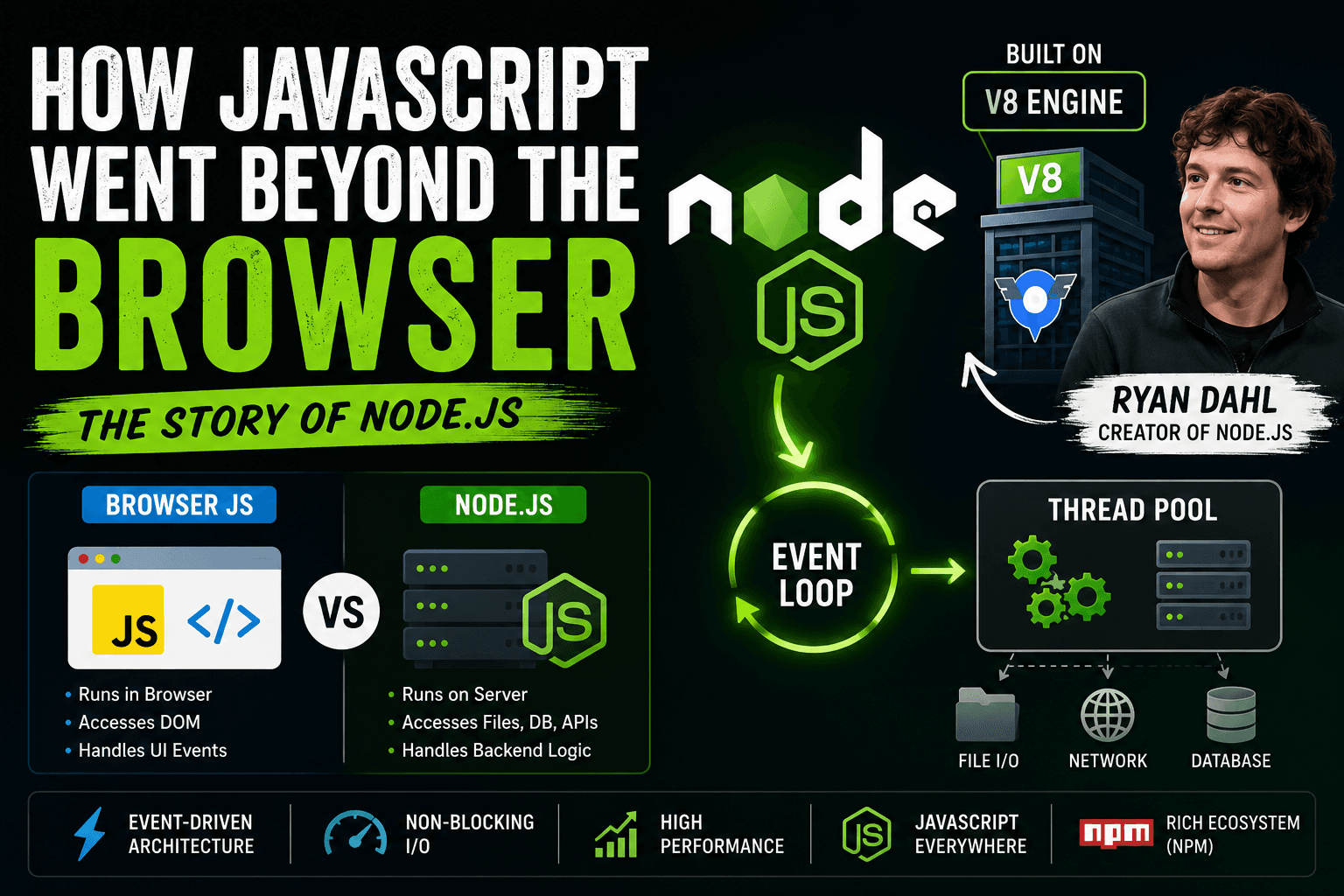
For years, JavaScript was a language limited to the browser. It was primarily used by developers to add interactivity to web pages, such as buttons, animations, form validation, and dynamic updates. Then everything changed in 2009 with the arrival of Node.js, a tool created by developer Ryan Dahl.
Ryan Dahl took the powerful V8 JavaScript engine from Google Chrome and combined it with an event-driven architecture and low-level system capabilities. This enabled JavaScript to be executed outside of the browser for the first time in a practical and scalable manner. Node.js rapidly became one of the most important technologies in modern web development.
What is Node.js?
Node.js is a JavaScript runtime that allows developers to run JavaScript code on the server side.
One of the most widely held misconceptions about Node.js is that it is a programming language. It isn't. JavaScript is the language. Node.js is the runtime that lets you run JavaScript outside the browser.
Before Node.js, JavaScript could only run in browsers (which had built-in JavaScript engines). Node.js broke this by putting the V8 engine into a stand-alone runtime.
In simple words:
JavaScript = the language
V8 = the engine that understands JavaScript
Node.js = the environment that allows us to run JavaScript outside of the browser.
Why JavaScript Was Originally Browser-Only
JavaScript was invented in 1995 to make websites interactive. Browsers such as Chrome, Firefox, and Safari incorporated JavaScript engines to parse and execute JavaScript code.
The browser had features like the following:
DOM manipulation
Handling events
Timer’s
Browser API
This dependence on browser APIs meant that JavaScript could not directly access operating systems, files, or network sockets like backend languages could.
At that time, backend development was dominated by technologies such as the following:
PHP
JavaScript
Ruby,
While JavaScript was stuck on the frontend, these languages handled databases, authentication, APIs, and server-side logic.
How Node.js Made JavaScript Run on the Server
Ryan Dahl understood that the asynchronous nature of JavaScript was perfect for performing lots of operations concurrently.
He used Chrome’s V8 engine and hooked it into C and C++ system-level libraries. This combination made Node.js.
The V8 engine compiles JavaScript straight into machine code, so it is very fast to run.
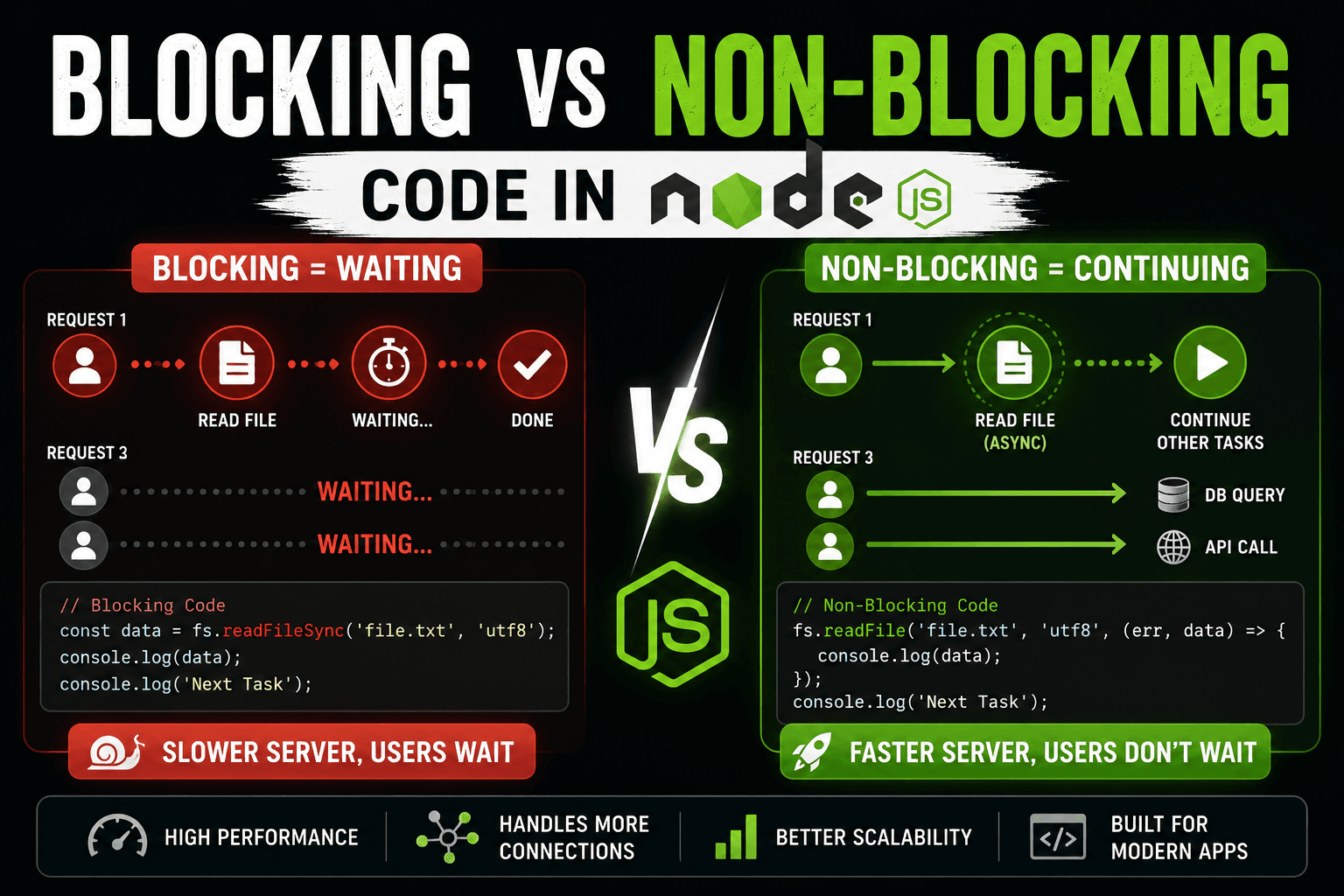
Node.js also brought with it an event loop and a non-blocking I/O model. Node.js can process other requests concurrently instead of waiting for one task to complete before starting another.
This made Node.js highly efficient for applications with large numbers of concurrent users.
Browser JavaScript vs Node.js
+-------------------+        +----------------------+
| Browser JavaScript|        |      Node.js         |
+-------------------+        +----------------------+
| Runs in browser   |        | Runs on server       |
| Accesses DOM      |        | Accesses file system |
| Handles UI events |        | Handles APIs         |
| Frontend logic    |        | Backend logic        |
| Browser APIs      |        | OS and network APIs  |
+-------------------+        +----------------------+
JavaScript in the browser is all about user interfaces. In Node.js, JavaScript is used for server operations, databases, APIs, authentication, etc.
High-Level Overview of the V8 Engine
V8 is Google Chrome’s JavaScript engine developed by Google.
Its main job is to convert JavaScript code into machine code that computers can execute very quickly.
Earlier JavaScript engines interpreted code line by line, which was slower. V8 improved performance using Just-In-Time (JIT) compilation.
You do not need to understand deep engine internals to use Node.js effectively. What matters is that V8 made JavaScript fast enough for server-side applications.
Understanding Event-Driven Architecture
V8 is a JavaScript engine developed by Google for Google Chrome.
Its primary function is to translate JavaScript code into machine code that computers can run extremely quickly.
The old JavaScript engines interpreted the code line by line, which was slower. V8 used Just-In-Time (JIT) compilation for better performance.
You don’t need to know how the engine works internally to be able to use Node.js. What matters is that V8 made JavaScript fast enough for server-side apps.
Understanding Event-Driven Architecture
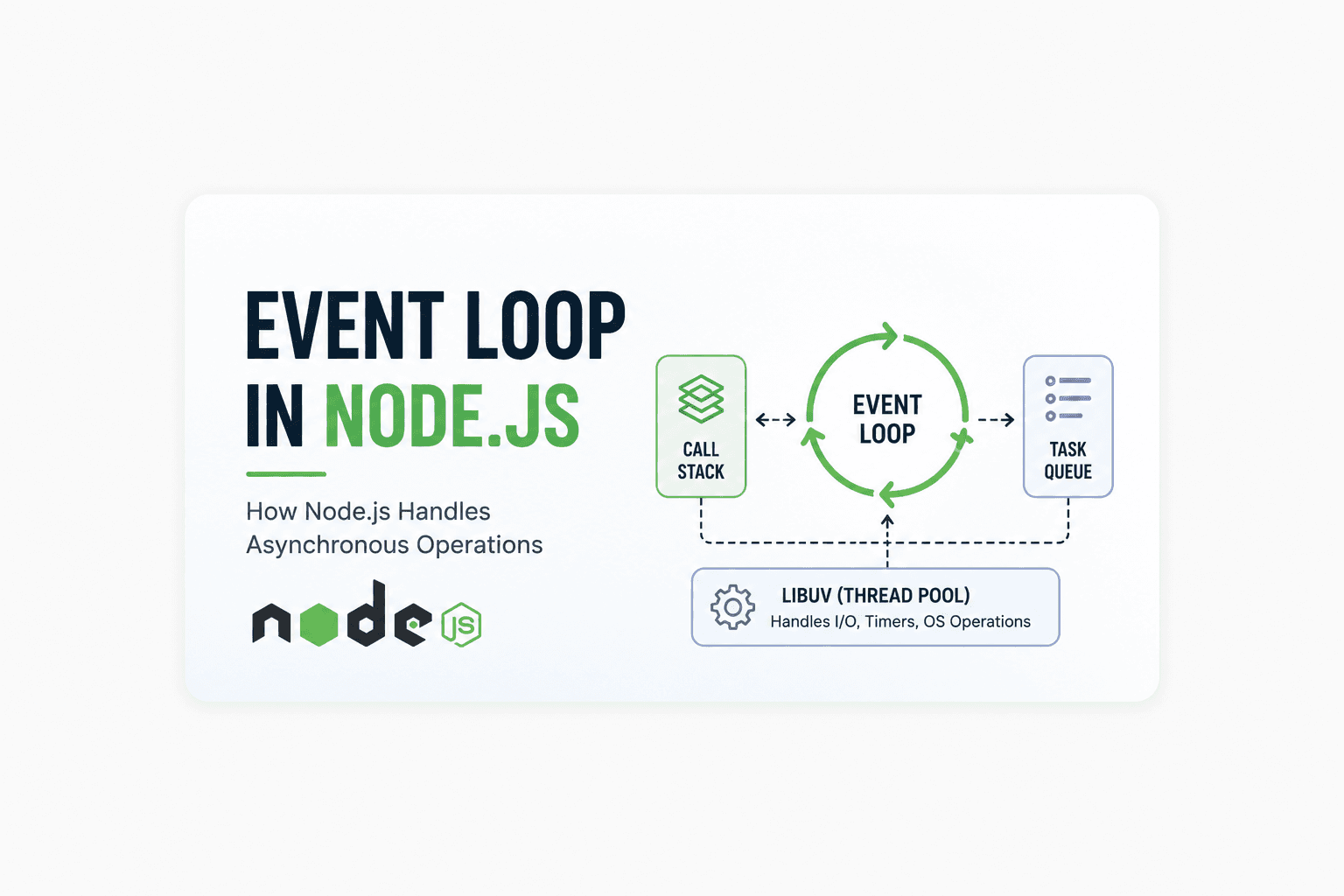
One of the biggest advantages of Node.js is its event-driven architecture.
Most traditional backend systems create a new thread for each request. This takes a lot of memory and resources from the system.
Node.js works differently.
Node.js primarily runs on a single thread with an event loop rather than spawning lots of threads.
Here is a simplified flow:

Phases of the Event Loop
Phase 1: Timer
Runs callbacks scheduled by it. Callbacks are invoked when their delay time is reached.
Phase 2: Pending Callbacks
Handles system-level callbacks that were deferred from previous operations.
This includes some network errors and completed TCP operations.
Phase 3: Idle / Prepare
An internal phase used by Node.js for preparation work.
Developers usually do not interact with this phase directly.
Phase 4: Poll
The most important phase where Node.js waits for and processes I/O events.
Tasks like file reading, database queries, and API responses are handled here.
Phase 5: Check
Executes callbacks scheduled using setImmediate().
This phase runs immediately after the poll phase completes.
Phase 6: Close Callbacks
Handles close events for resources like sockets and streams.
For example, socket.on('close') callbacks execute in this phase.
Node.js vs Traditional Backend Runtimes
PHP
Often in PHP, each request is a new process or thread. This is great for a lot of applications, but can be resource-heavy when you have high traffic.
JavaScript
Java is multi-threaded and very powerful for enterprise systems. But dealing with threads can complicate things.
Node.js
Asynchronous and non-blocking Node.js is. It can handle many concurrent connections with fewer resources.
That’s why developers quickly jumped on Node.js for real-time applications and scalable APIs.
Real-World Use Cases of Node.js
Node.js is widely used in modern development because of its speed and scalability.
Popular use cases include:
Real-time chat applications
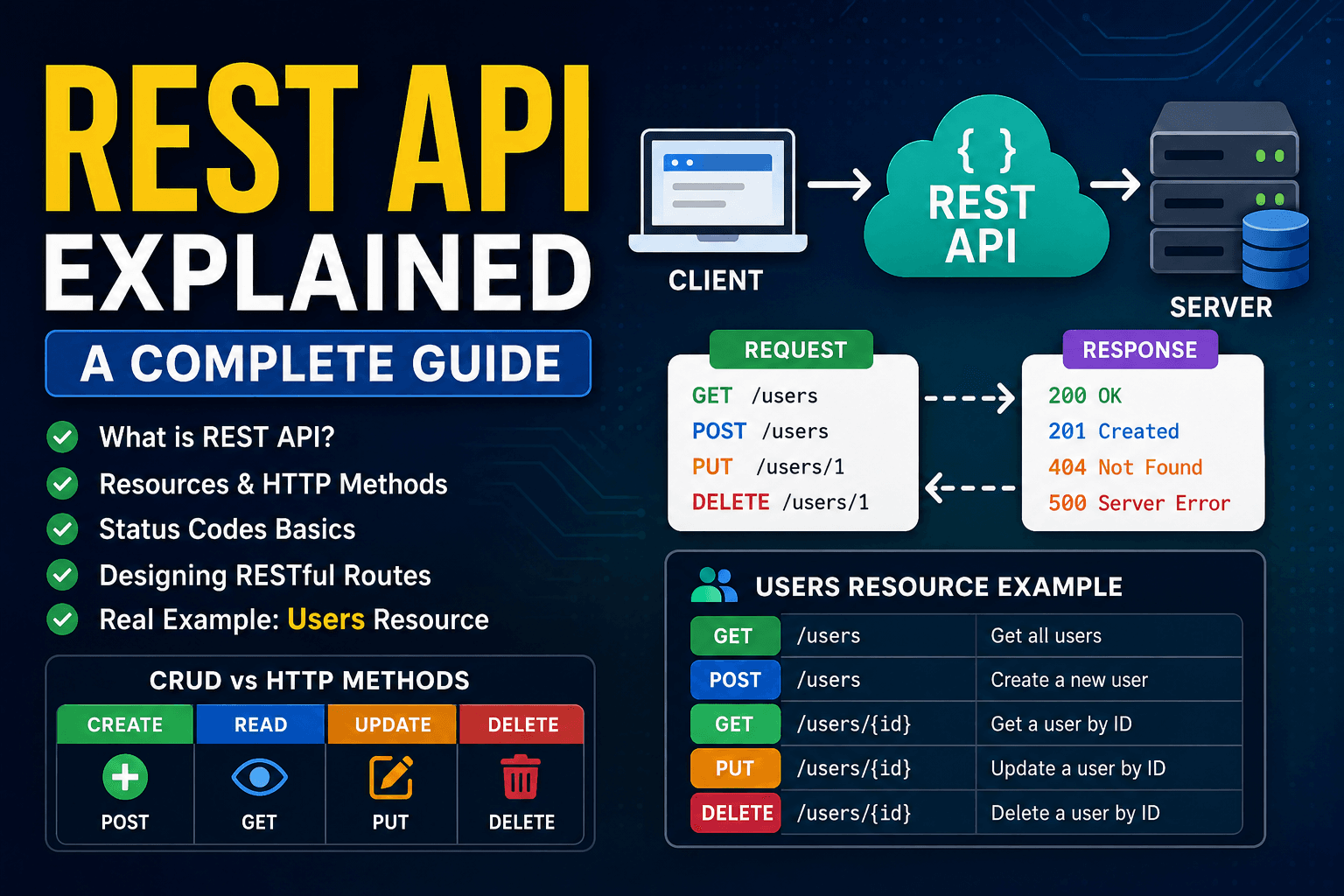
REST APIs
Streaming platforms
Multiplayer games
Collaboration tools
Microservices
Serverless functions
Major companies like Netflix, PayPal, and LinkedIn have used Node.js in production systems.
Why Developers Loved Node.js
Node.js solved multiple problems at once:
Developers could use one language for the frontend and backend
Faster development workflow
Huge open-source ecosystem through npm
Excellent performance for I/O-heavy applications
Easier real-time communication handling
Most importantly, Node.js made JavaScript a full-stack technology.