Understanding REST APIs for Beginners
Understanding REST APIs in Web Development
Modern web applications constantly communicate with servers. Whether you are logging into a website, viewing products in an e-commerce app, or updating your profile on social media, APIs are working behind the scenes to transfer data between the client and server.
One of the most common architectural styles used for this communication is the REST API.
REST stands for Representational State Transfer. It is not a programming language or framework. Instead, it is a set of principles used for designing web services that are simple, scalable, and easy to maintain.
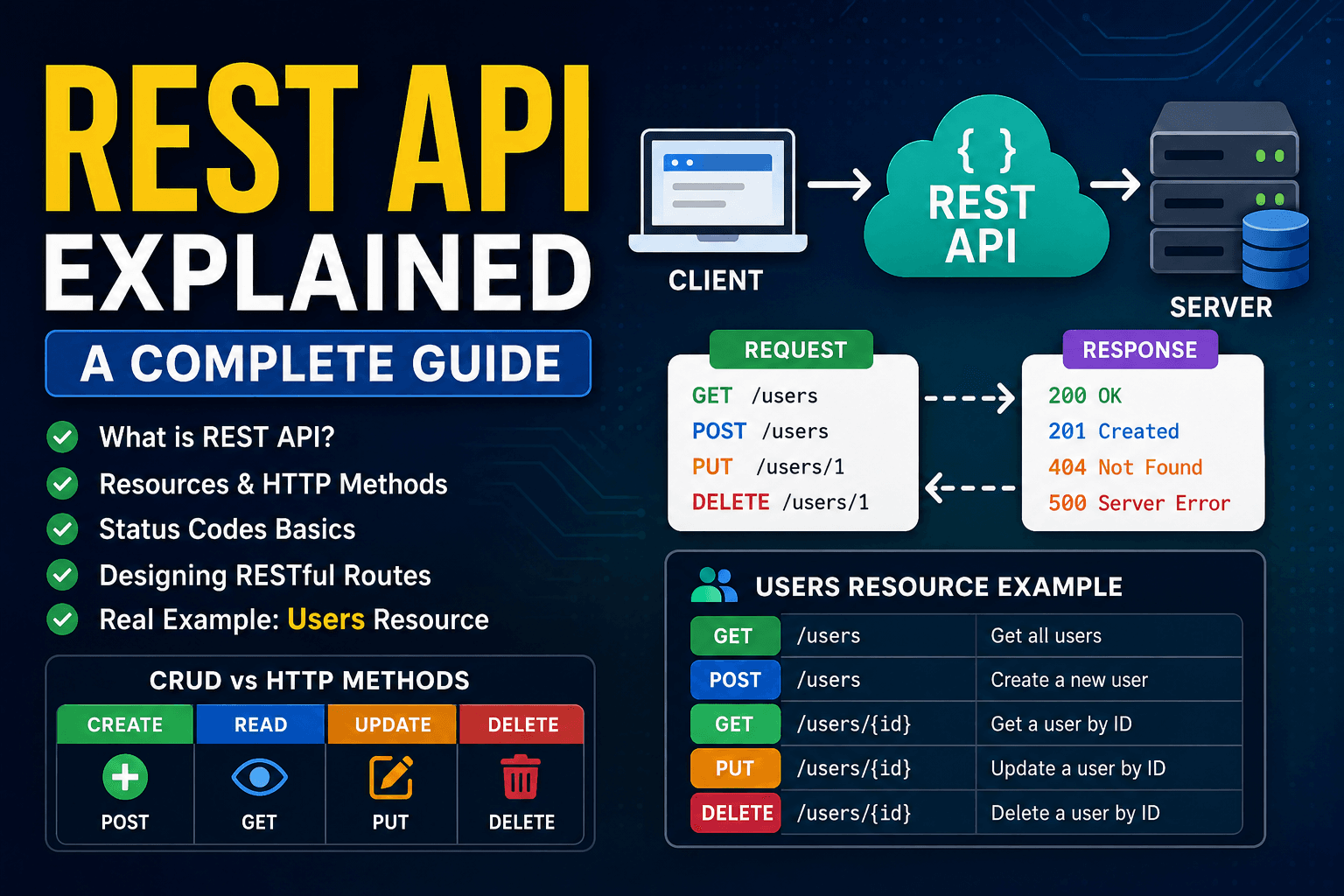
A REST API allows clients and servers to communicate using standard HTTP methods.
Think of it like this:
- The client could be a browser, mobile app, or frontend application
- The server stores and manages data
- The API acts as the bridge between them
When the client requests data, the server processes the request and sends back a response, usually in JSON format.
What Are Resources in REST?
In REST architecture, everything is treated as a resource.
A resource is simply a piece of data managed by the server.
Examples:
- Users
- Products
- Orders
- Comments
- Posts
Each resource has its own URL endpoint.
/users
/products
/orders
If you want information about a specific user:
/users/101
Here, 101 represents the ID of a particular user resource.
REST APIs focus on resources instead of actions. This keeps APIs clean and predictable.
Understanding HTTP Methods
REST APIs use HTTP methods to define what action should happen to a resource.
The four most common methods are GET, POST, PUT, and DELETE.
GET Request
GET is used to retrieve data from the server.
Example:
GET /users
This fetches all users.
GET /users/1
This fetches a single user with ID 1.
GET requests should never modify data. They are only for reading information.
POST Request
POST is used to create new resources.
Example:
POST /users
Request body:
{
  "name": "Pallab",
  "email": "pallab@example.com"
}
The server creates a new user and stores it in the database.
POST is mainly used when adding fresh data to the server.
PUT Request
PUT is used to update an existing resource.
Example:
PUT /users/1
Request body:
{
  "name": "Pallab Karmakar",
  "email": "pk@example.com"
}
The server updates the user with ID 1.
PUT usually replaces the entire resource with updated data.
DELETE Request
DELETE removes a resource from the server.
Example:
DELETE /users/1
The server deletes the user with ID 1 from the database.
This completes the CRUD operations in REST APIs.
CRUD means:
| Operation | HTTP Method |
|---|---|
| Create | POST |
| Read | GET |
| Update | PUT |
| Delete | DELETE |
Status Codes in REST APIs
Whenever the server responds, it also sends an HTTP status code.
Status codes help the client understand whether the request succeeded or failed.
Common status codes:
| Status Code | Meaning |
|---|---|
| 200 | Request successful |
| 201 | Resource created successfully |
| 400 | Bad request from client |
| 401 | Unauthorized access |
| 404 | Resource not found |
| 500 | Internal server error |
Example:
If a user is successfully fetched:
200 OK
If the requested user does not exist:
404 Not Found
Status codes make APIs easier to debug and understand.
Designing RESTful Routes
A well-designed REST API follows consistent naming conventions.
Good route design:
GET /users
POST /users
GET /users/1
PUT /users/1
DELETE /users/1
Bad route design:
/getUsers
/createUser
/deleteUserById
REST APIs should focus on nouns (resources) instead of verbs (actions).
The HTTP method already explains the action being performed.
REST Request-Response Lifecycle
Here is how a REST API request typically works:
- Client sends an HTTP request
- The request reaches the server
- The server processes the request
- Database operations may happen
- The server sends back a response with data and status code
Example flow:
Client → GET /users → Server → Database → Response(JSON)
This request-response cycle powers almost every modern web application.
Why REST APIs Are Popular
REST APIs are widely used because they are:
- Simple to understand
- Lightweight
- Scalable
- Platform independent
- Easy to integrate with frontend apps
They work perfectly with modern technologies like React, React Native, Angular, Vue, and mobile applications.
Conclusion
REST APIs are the foundation of communication in modern web development. They allow clients and servers to exchange data efficiently using resources, HTTP methods, and status codes.
Understanding concepts like GET, POST, PUT, DELETE, route structure, and status codes is essential for every web developer. Once you understand REST principles, building scalable backend systems becomes much easier.
Whether you are creating a blog platform, social media app, or e-commerce website, REST APIs remain one of the most important tools in full-stack development.